

Financial Reporting Benchmarks
| Metric | Benchmark |
|---|---|
| Standard SMB monthly report set | P&L, balance sheet, cash flow, KPI dashboard |
| Days to close month-end (best-in-class) | 5-7 business days |
| Days to close month-end (typical SMB) | 15-25 business days |
| Page count for a good board package | 10-15 pages |
| SMBs that get monthly financials within 10 days | ~35% |
| Material variance threshold to investigate | +/- 5% on revenue, +/- 3pp on margin |
| Cost of bad reporting (bad decisions, fees) | 1-3% of revenue annually |
| QuickBooks Online users among US SMBs | ~80% of accounting market |
Most SMB owners feel lost when trying to turn raw transactions into a clear picture of their business. The numbers are there — in spreadsheets, accounting software, and bank statements — but turning them into something that actually guides decisions is a different skill entirely. CFOs rely on structured, layered reports every single day to manage risk, spot opportunities, and plan ahead. The good news is that you do not need a full-time CFO to get there. This guide walks you through every stage of building financial reports that do more than satisfy your accountant.
Table of Contents
- Why financial reports matter for your business
- Essential tools and information before you start
- Step-by-step: Building your financial report
- Troubleshooting and avoiding common mistakes
- Turning reports into CFO-level insights
- What most guides miss: The critical habits enabling CFO-level reporting
- Make financial reporting easier with expert guidance
- Frequently asked questions
Key Takeaways
| Point | Details |
|---|---|
| CFO-level reporting | Going beyond basic statements with supporting reports and KPIs unlocks strategic insights. |
| Avoid common errors | Regular reconciliation and accurate classification are key to reliable financial reports. |
| Turn reports into action | Interpret data to detect risks and opportunities for performance improvement. |
| Use the right tools | Accurate, timely reports require robust accounting software and consistent data sources. |
Why financial reports matter for your business
Financial reports serve a purpose far beyond tax season. When built correctly, they tell you whether your business is profitable, whether you have enough cash to cover next month’s payroll, and whether you are growing in the right direction. For SMB owners juggling operations and sales at the same time, that clarity is not a luxury. It is a survival tool.
Most owners stop at the basics: a profit and loss statement, a balance sheet, and maybe a cash flow statement. Those three documents are the foundation, but they leave out a huge amount of strategic context. CFO-level reporting adds layers that explain why the numbers look the way they do, not just what they are.
Here is what better financial reporting actually gives you:
- Better decisions. When you can see margin by product line or customer segment, you stop guessing about where to invest.
- Growth tracking. Month-over-month and year-over-year comparisons reveal whether momentum is building or fading.
- Investor and lender confidence. Clean, well-organized reports signal that your business is managed professionally.
- Early warning signals. Aging receivables or a shrinking cash runway appear early in a detailed report, giving you time to act.
- Accountability. When your team sees KPIs tracked consistently, behavior changes.
The shift from basic compliance reporting to CFO-level reporting means adding tools like accounts receivable aging, accounts payable aging, cash flow forecasting, and KPI dashboards. These reports explain working-capital timing and variance drivers, not just compliance outputs, which is the core difference between reporting for the IRS and reporting for growth.
“CFO-level reporting is not about generating more paper. It is about building a financial lens that turns historical data into forward-looking strategy.”
Essential tools and information before you start
Before you build a single report, you need the right raw material. Jumping into report creation without organized data is like baking without measuring your ingredients. You will produce something, but it probably will not be what you intended.
The core inputs every SMB needs before building financial reports include:
- Accounting software such as QuickBooks, Xero, or FreshBooks, with all transactions recorded and categorized
- Bank and credit card statements reconciled against your books for the reporting period
- Invoices and receipts organized by category and date
- Payroll records broken down by department or cost center if possible
- Loan and liability schedules so you can accurately reflect debt obligations on the balance sheet
Beyond the basics, the supporting reports for SMBs include accounts receivable aging, accounts payable aging, budget vs. actual comparisons, and cash flow forecasting. A KPI dashboard and review is used alongside these core statements to give management a real-time pulse on the business.

| Tool or resource | Best for |
|---|---|
| QuickBooks Online | Core statements, payroll integration, bank feeds |
| Xero | Multi-currency, clean UI, strong reconciliation tools |
| Google Sheets or Excel | Budget vs. actual modeling, custom KPI dashboards |
| Fathom or Spotlight Reporting | Visual KPI dashboards, variance analysis |
| Bank statement exports (PDF/CSV) | Reconciliation verification |
| Payroll platform reports | Labor cost allocation by department |
Pro Tip: Build a reporting checklist at the start of each month that lists every document you need before you can close the books. This single habit cuts report preparation time in half and dramatically reduces the number of errors you have to fix later.
Investing time in your data infrastructure pays off immediately. If your transactions are misclassified or your bank feeds are outdated, every report you produce downstream will carry those errors forward. Getting clean inputs is not optional. It is the entire foundation of reliable reporting. A strong working capital optimization strategy also depends on having accurate, timely data at the start of each cycle.
Step-by-step: Building your financial report
With clean data and the right tools in hand, you are ready to build. The workflow below applies whether you are producing monthly reports for internal review or preparing a reporting package for an investor or lender.
- Prepare and clean your data. Run a transaction detail report from your accounting software. Look for uncategorized entries, duplicate transactions, and missing invoices. Fix these before moving forward.
- Classify all transactions correctly. This is where many reports break down. Misclassified expenses like payroll recorded under cost of goods sold, or capital purchases expensed rather than capitalized, distort your results significantly.
- Reconcile all bank and credit card accounts. Every account balance in your books should match the corresponding statement balance. Do not skip this step.
- Assemble the three core statements. Generate your profit and loss statement, balance sheet, and cash flow statement for the period. Review each one for obvious anomalies before moving on.
- Add your supporting reports. Layer in accounts receivable aging, accounts payable aging, a budget vs. actual comparison, and your cash flow forecast. These are the reports that transform a compliance package into a management tool.
- Review and validate. Compare this period’s results against the prior period and the same period last year. Investigate any variance larger than 10 percent before signing off.
| Standard compliance report | CFO-level equivalent |
|---|---|
| Profit and loss statement | P&L with margin analysis by product or segment |
| Balance sheet | Balance sheet with working capital ratio and debt schedule |
| Cash flow statement | 13-week cash flow forecast with scenario modeling |
| Basic trial balance | Budget vs. actual with variance commentary |
| Accounts receivable summary | AR aging by customer with collection status |
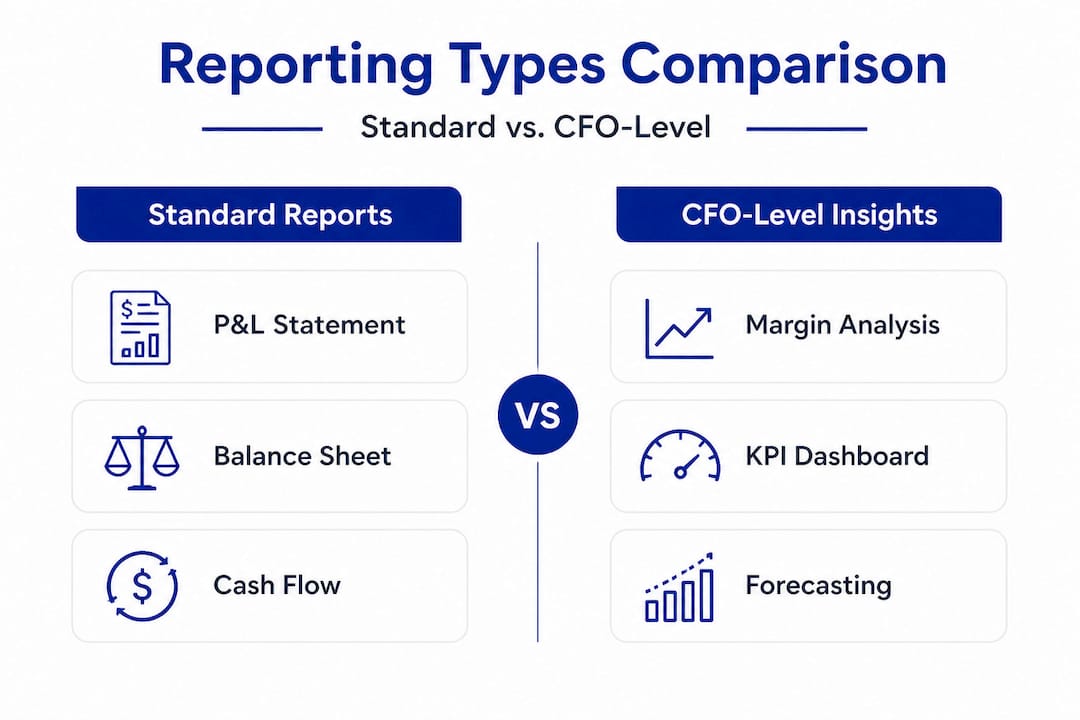
The comparison above makes it clear why many SMB owners feel like their reports are not telling them enough. Standard outputs answer “what happened.” CFO-level reports answer “so what” and “what next.”
Pro Tip: Always reconcile your accounts completely before finalizing any report. Unreconciled accounts are the single most common source of report errors, and they almost always surface at the worst possible moment, like during a bank review or investor due diligence. A clean CFO support workflow builds reconciliation as a non-negotiable step, not an afterthought.
Troubleshooting and avoiding common mistakes
Even experienced bookkeepers make reporting errors. The difference between a reliable report and a misleading one often comes down to a handful of recurring mistakes that are easy to prevent once you know what to look for.
The most common financial reporting errors include:
- Revenue recorded in the wrong period. If you receive a payment in December for work delivered in January, it belongs in January. Cutoff errors like this skew both your revenue and your tax liability.
- Misclassified expenses. Payroll booked as a direct cost when it belongs in overhead, or repairs expensed when they should be capitalized, change your gross margin and net income in ways that are hard to trace later.
- Manual data entry mistakes. Transposing numbers or duplicating invoices are surprisingly common and can go unnoticed for months if reconciliation is skipped.
- Missing or late transactions. Vendor bills that arrive after the period closes, or expenses charged to a personal card, create gaps in your records that make your reports look better than they are.
- Unreconciled accounts. If your bank account in the software does not match the actual statement, you are building every downstream report on a shaky foundation.
Typical financial report errors include revenue in the wrong period, misclassified expenses, manual data entry errors, missing or late transactions, and accounts not properly reconciled. Each of these is preventable with the right process.
“Period accuracy is not a technical detail. It is the difference between a report that guides your next decision and one that quietly misleads you for months.”
Pro Tip: Set a calendar reminder for the 5th of every month to complete your prior-month reconciliation. This creates a consistent rhythm that prevents late adjustments from piling up and makes your monthly close faster every time.
Consistent error prevention also requires reviewing your CFO-led financial analysis with fresh eyes at least once per quarter. What looks clean at a transactional level can still carry systematic classification errors that only surface when you look at patterns across multiple periods.
Turning reports into CFO-level insights
Producing clean reports is the foundation. Using them to make smarter decisions is the goal. Here is where most SMB owners stop short. They generate the numbers, file them away, and move on. A CFO treats the same documents as the starting point of a conversation.
Reading beyond the numbers means recognizing patterns. Is your gross margin contracting slowly every quarter? That is a pricing problem or a cost problem, and you need to know which. Are your receivables aging further out each month? That signals a collections process issue, not just a cash flow issue.
A KPI dashboard alongside core statements gives you a structured way to spot these patterns without having to dig through line items every time. It puts the metrics that matter most front and center.
The KPIs worth monitoring every month include:
- Gross margin percentage by product, service line, or customer segment
- Days sales outstanding (DSO), which measures how quickly customers pay
- Days payable outstanding (DPO), which reflects how efficiently you use vendor credit
- Operating cash flow ratio, comparing cash generated to current liabilities
- Budget vs. actual variance, flagged by department or cost center
- Customer acquisition cost vs. lifetime value, especially critical for subscription or recurring-revenue businesses
For industry-specific financial analysis, the specific KPIs shift. A services firm watches utilization rates and project margin. A product-based business tracks inventory turnover and landed cost per unit. The framework is the same, but the inputs reflect the operational realities of each model.
The power of CFO-level reporting is not in any single metric. It is in the conversation that happens when you bring several metrics together. When revenue is up but cash is flat and receivables are growing, that is a story. Your reports should tell that story clearly, every single month.
What most guides miss: The critical habits enabling CFO-level reporting
Most articles about financial reporting focus on the documents themselves. They explain what a balance sheet is, or how to categorize expenses. That is useful, but it misses the more important point. The quality of your financial reports is almost entirely a function of your habits, not your tools.
We have worked with SMB owners who had enterprise-level accounting software and still produced reports full of errors, because they recorded transactions inconsistently and skipped reconciliation whenever things got busy. We have also seen businesses using basic spreadsheets produce board-ready reporting packages because the owner treated financial discipline as a non-negotiable weekly practice.
Consistency beats sophistication in SMB reporting. Every time. A simple process done reliably produces better outcomes than a complex system used sporadically.
“A $50,000 dashboard built on inconsistent data is worth less than a well-maintained spreadsheet updated every Friday afternoon.”
The most impactful habit you can build is a weekly 30-minute financial review. Check your bank balance against your books. Review any new transactions for correct classification. Look at your receivables aging and flag anything past 30 days. This is not glamorous work, but it is the work that prevents the surprises that derail growing businesses.
The second habit is treating your month-end close as a ritual, not an emergency. Block time at the start of each month to close the prior month completely before moving on. Businesses that let multiple months accumulate before closing the books always find it harder, take longer, and introduce more errors.
What most guides also miss is that financial reporting is not a document. It is a repeatable process embedded into how you run your business. The effective CFO support workflow creates that structure so reporting becomes part of operations, not a separate project you get to when you have time.
Make financial reporting easier with expert guidance
Building CFO-level reports takes time to set up correctly, but you do not have to figure it out alone.
John Galt Finance works directly with SMB owners to build structured reporting systems, from a cash flow forecasting guide to complete monthly reporting packages that deliver the strategic clarity your business needs to grow. Whether you need a financial planning framework built from scratch or want to upgrade your existing reporting to something investor-ready, our team brings the CFO-level structure and discipline your business deserves. Explore our custom financial modeling process to see how we tailor financial tools to your specific industry and growth stage.
Frequently asked questions
What are the most important financial reports for SMBs?
SMBs should prioritize accounts receivable aging, payable aging, budget vs. actual comparisons, cash flow forecasting, and KPI dashboards alongside the three core financial statements. These reports together provide both historical accuracy and forward-looking insight.
How can I avoid common financial report errors?
Reconcile accounts at least monthly, classify transactions correctly from the moment they are recorded, and review for missing or late entries at every period close. Consistent habits eliminate the vast majority of reporting errors before they happen.
What software should I use for financial reporting?
Cloud-based platforms like QuickBooks Online or Xero handle core statements well, but always ensure your software allows data export for custom KPI dashboards and supporting reports. The best tool is the one your team actually uses consistently.
How often should SMBs create and review financial reports?
Most financial experts recommend closing books and reviewing key reports monthly, with a dedicated weekly check of cash position and receivables aging for tighter operational control.
What’s the benefit of adding a KPI dashboard to my reports?
A KPI dashboard alongside core statements surfaces trends and risks faster than reading line items, allowing owners to make better decisions more quickly without needing to interpret raw data every time.
Recommended
- Essential financial metrics to track for SMB growth: 2026
- Unlock business growth with a custom financial modeling process
- Board Reporting for SMBs: What to Include and Why It Matters | John Galt
- Build a CFO support workflow that drives SMB growth
FAQ
What financial reports should I produce every month?
The core four: P&L (with budget comparison), balance sheet, cash flow statement, and a one-page KPI dashboard. Add a 13-week cash forecast and variance commentary for executive review. Anything more becomes noise; anything less leaves blind spots.
How do I close the books faster?
Three fixes deliver 80% of the speed-up: (1) close credit card and bank feeds within 3 days, (2) automate revenue recognition rules, (3) document a 30-step close checklist with owners and deadlines. Most SMBs that close in 20 days can get to 10 in one quarter.
Should I produce financial reports myself or outsource it?
If you spend more than 10 hours/month on close and reporting as a founder, outsource. A bookkeeper at $40-75/hr or a CFO firm with controller services typically pays back through your time alone. Reserve your hours for revenue-generating work.
What’s the difference between accrual and cash-basis reporting?
Cash-basis records revenue when received and expenses when paid. Accrual records them when earned/incurred. Cash is simpler; accrual is required for accurate margins and is mandatory above $26M revenue (IRS Sec 448 threshold for 2025). Most SMBs over $1M revenue should use accrual.
How do I get the leadership team to actually read the reports?
Lead with a one-page executive summary: 3 wins, 3 risks, 3 asks. Bury the GAAP statements in appendix pages. Send the package 24-48 hours before discussion. See our financial dashboard guide for layout templates.